Prioritize My Lists
Prioritize My Lists is the to-do list that answers the question every other list leaves to you: what should I do first?

One-time purchase. Free trial available.
About Prioritize My Lists
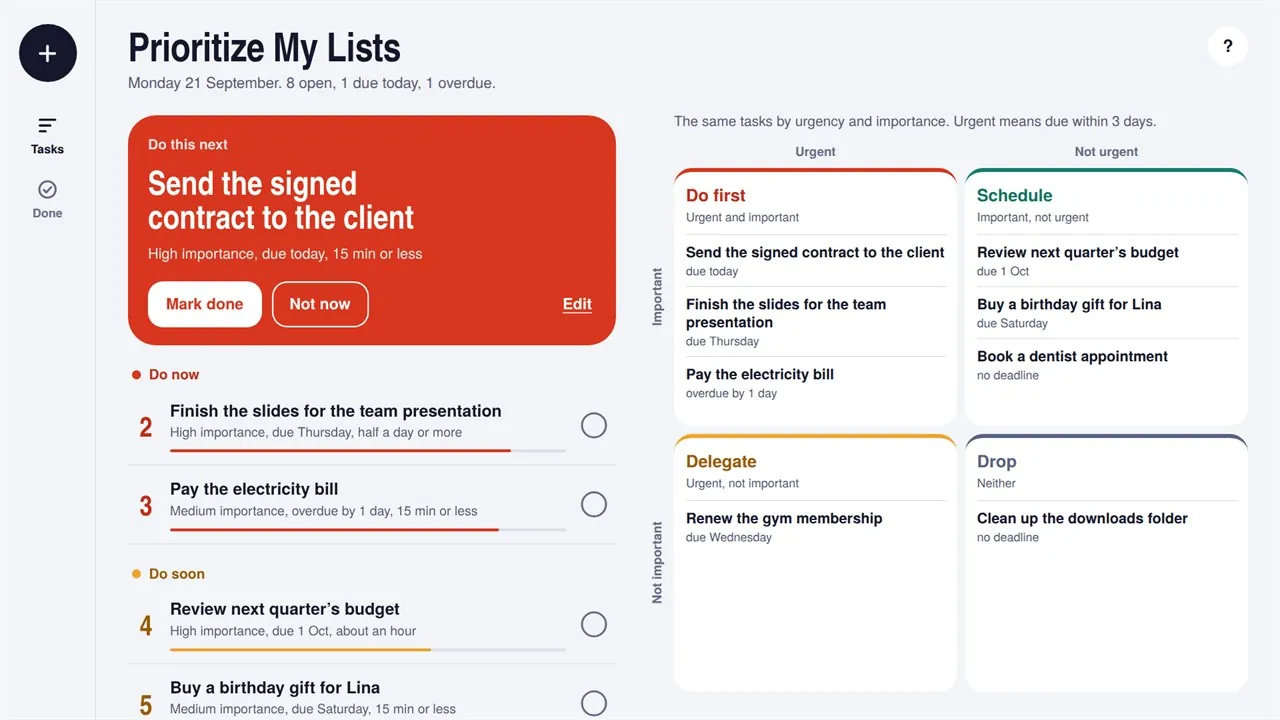
For each task, tell the app three things: how important it is, when it is due and how long it will take. It scores every task and shows the one to do next on a large card at the top, with the reason underneath.
The order keeps itself up to date. As a deadline gets closer, its task climbs, anything overdue goes straight to the top, and quick jobs win ties so small wins don't get buried. If you can't do the top task right now, press “Not now” and it steps aside for three hours. The Matrix view sorts the same tasks into Do first, Schedule, Delegate and Drop.
Every task shows why it ranks where it does, and a short page explains the scoring in plain language. There is no account, no sign-in and no tracking. Your list stays on your PC, works without an internet connection, and moves to another PC with a backup file.
Key features
- Ranks every task by importance, deadline and effort
- Shows the single task to do next, and why
- The order updates as deadlines approach; overdue tasks rise to the top
- Quick jobs win ties, so small wins aren't buried
- “Not now” sets the top task aside for three hours
- Matrix view: Do first, Schedule, Delegate and Drop
- A plain-language explanation of the scoring
- Add a task with a single key
- Light and dark mode that follow Windows
- Works offline, with a backup file to move your list to another PC
- No account, no ads, no tracking
Who it's for
Anyone whose day fills up faster than it empties: professionals, students, freelancers and parents.